Am I allowed? · Manufactured homes
Starlink on a manufactured or mobile home
Starlink works on a manufactured home like on any other, as long as the dish sees open sky. Three things are different: a light roof, park rules, and wind. Here’s how to handle each, step by step.
$100First Starlink? The pre-order checklist and our referral linkYes. Put the dish on a pole in your lot or a bracket on the wall framing rather than a thin roof. By our reading, the FCC rule covers the home and the lot you own or lease, even in a park.
Park roads and common areas aren’t covered. Run the cable behind the skirting, off the ground, and plan for wind. Starlink publishes nothing specific to manufactured homes, so the structural advice here is our rule of thumb. General information, not legal or structural advice.
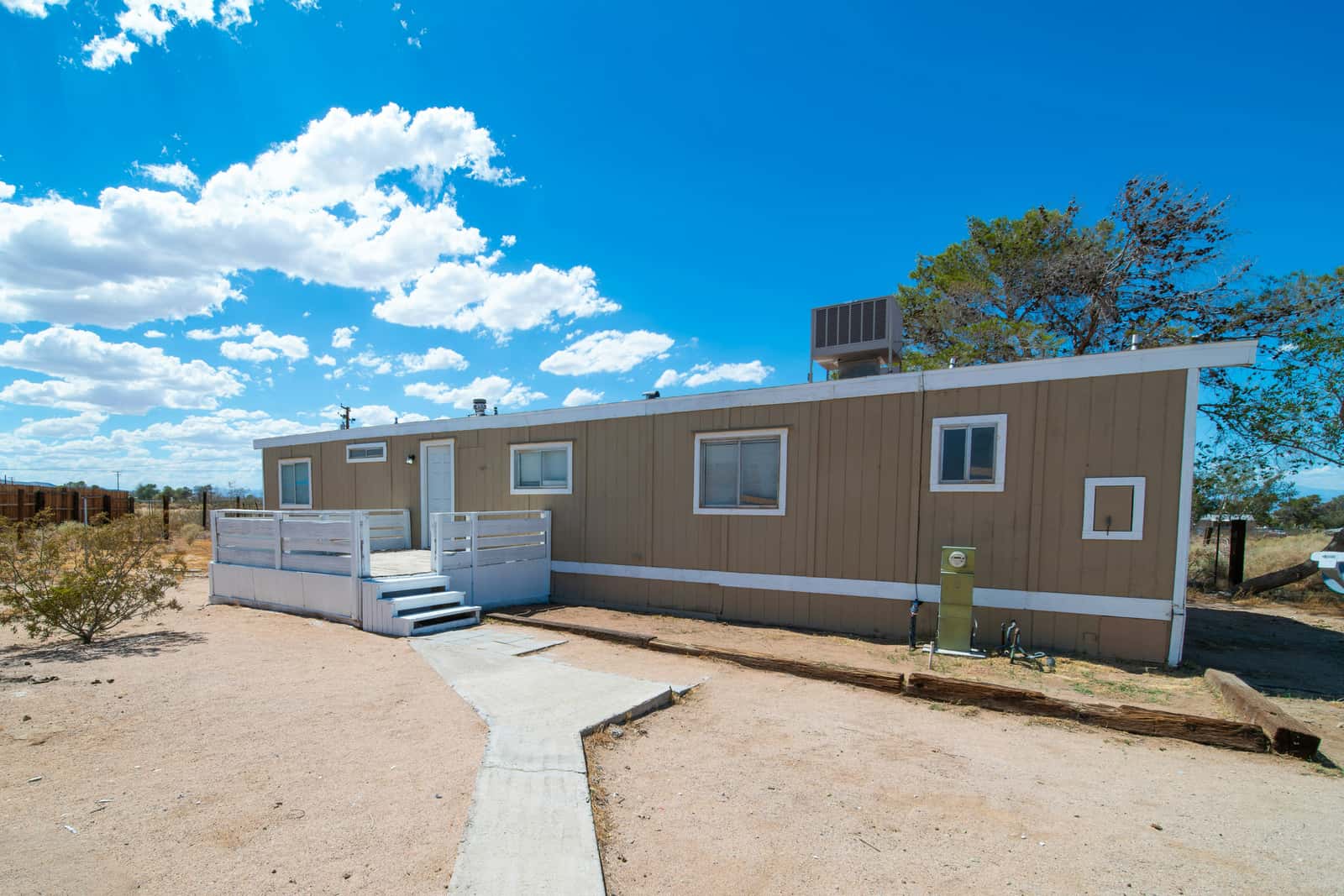
Where the dish goes on a manufactured home
Starlink’s advice is the same for every home: if there’s no clear view from the ground, Starlink says to use an elevated spot such as a roof, pole or wall. On a manufactured home, the pole and the wall are usually the better two of those three.
- AWorks. Pole in your own lot, set in the ground: nothing rests on the roof, and it can lift the dish above nearby trees.
- BWorks. Bracket on the end wall near the roofline, screwed into the wall framing, not just the siding.
- CCheck first. On the roof: many manufactured-home roofs are built light. Ask the home’s maker or a roofer before anyone climbs or drills.
- A: Pole in your lot. Nothing rests on the roof, and a pole can lift the dish above trees. Starlink’s Standard Pipe Adapter fits poles 31–63.5 mm (1.25–2.5 in) across; metal pipes only, not PVC or plastic; pipe not included. The V5 kit includes its own adapter, which Starlink says fits poles 31–50 mm (1.2–2.0 in) across. Pole mounts.
- B: End-wall bracket. Starlink describes its Wall Mount as for an exterior wall near the top of the gable or fascia; fits a 4-inch overhang at most. For the V5, the Home Mount is double-pivot, for vertical, sloped or flat surfaces; typical spots are the fascia board near the roofline or directly on a sloped roof. Screw into framing, not just siding. Wall and eave mounts.
- C: The roof. Possible, but check first. See the next section.
Why not the roof?
Our rule of thumb, not a Starlink statement: many manufactured homes have lighter roof framing than a site-built house, and many have metal or membrane roofs that dent or leak when walked on or drilled. Three Starlink facts add to that:
- Metal: Starlink says metal mounts wrapping the base, or setting the dish on metal, may hurt GPS and aren’t supported (its “Determining location” alert).
- No-drill ridge mount: no drilling, sits on a gable ridge with ballast; metal or shingle roofs under 45°; not for clay tile; wind rating up to 50 mph. Its ballast alone weighs 25.3 kg (55.8 lb), which is a lot to set on a light roof.
- Your roof warranty: Starlink’s Terms say: “If you require a permanent roof or vehicle mount installation, you acknowledge the potential risks associated with this type of installation, including, without limitation, with respect to any warranty that applies to your roof, vehicle, vessel for penetration of the membrane.”
Find your data plate
Most HUD-code manufactured homes have a data plate, usually inside a kitchen cabinet door, a bedroom closet or near the electrical panel. It lists the wind and roof-load zones the home was built for. Read it, and ask the maker or a roofer before anyone climbs on or drills the roof.
Step by step
Step 1: Scan from the ground, then higher
Open the Starlink app and scan from the yard first. Starlink says the app has a built-in tool to preview the install location and guide you to the spot with the fewest obstructions. If trees or the home block the low sky, scan again from a ladder near the end wall or with the phone held up on a pole.
Step 2: Pick a pole or wall spot, not the roof
A pole in your lot or a bracket on the end wall keeps weight and holes off a light roof. Choose the roof only if the home’s maker or a roofer says it can take it.
Step 3: Check your lot lines and park rules
In a park, find your lot boundary and the park’s antenna rule. Tell the manager in writing where the dish will go, with your scan screenshots.
Step 4: Call 811 before you dig
Before digging a pole footing, call 811 (the US call-before-you-dig line) so buried power, gas and water lines get marked. In a park, ask the manager too: many lines run between homes.
Step 5: Fix the mount into solid structure
Set the pole in a footing, or screw the wall bracket into the wall framing. Starlink says to drill the wall mount’s holes into a structural beam, and to leave clearance around a wall mount: the dish may need to rotate to align.
Step 6: Run the cable behind the skirting
Bring the cable down, in behind the skirting, along the underside off the ground, and up into the home through a sealed hole. Leave a drip loop outside below every entry.
Step 7: Plan for storms
Starlink says the kit is not designed for hurricanes, tornadoes, earthquakes or other extreme forces of nature. When hurricane-force winds are forecast, its advice is: if it is safe, bring your Starlink and cables indoors.
Park rules and the FCC rule
The FCC’s OTARD rule (47 CFR 1.4000) limits HOA rules, lease clauses and similar restrictions on a small dish on property you own or lease and use alone. In 1998 the FCC spelled out what that means for manufactured homes:
FCC Second Report and Order, 1998
“while restrictions on placement of antennas on manufactured homes are already covered by the current rules, this new rule expands protection of the Section 207 rules to the leased property on which the manufactured home sits.”
“Typically, for apartments, this new ruling will include balconies, balcony railings, and terraces; for rented single family homes or manufactured homes which sit on rented property, it will typically include patios, yards or gardens within the leasehold.”
- AWorks. Pole in your lot: the rule covers the lot you lease, and masts too.
- BWorks. Wall or eave of your home, screwed into framing.
- CCheck first. Roof: many are built light. Ask the home’s maker first.
- DNot yours. Beside the park road: park land, not your lot.
- Covered (our reading): the home itself, and the yard, patio or deck inside your leased lot. A mast counts too: the rule covers “A mast supporting an antenna”.
- Not covered: park roads, the clubhouse, shared green space and anything outside your lot.
- Still allowed: clearly defined safety rules, such as how far a pole must stand from power lines or the road.
Renting the home itself from the park? See renting a house. That a Starlink dish is covered at all is our reading; the rule names no product. The full rule.
Wind: the dish, the mount and the home
| Item | What Starlink says |
|---|---|
| Standard 4 X dish | Operational in winds of 60 mph+ |
| V5 dish, mounted | Operational in 165 mph winds |
| Ridgeline Mount | Wind rating up to 50 mph |
| Any kit | Starlink is not designed for hurricanes, tornadoes, earthquakes or other extreme forces of nature |
Your home’s tie-downs hold the home, not the dish. Our rules of thumb: brace or guy a tall pole, add a safety tether, and check the bolts after big storms. Before hurricane-force winds, Starlink says to bring the dish and cables indoors if it is safe, and: “If you cannot bring your cable inside, protect the exposed ends from water. If the cable does get wet, ensure the cable fully dries out before reconnecting your Starlink.” Weather and storms.
The cable and the skirting
Every current kit comes with a 15 m (49.2 ft) cable. For a pole farther out, Starlink sells a longer one: Starlink Cable 45 m (147 ft), for V4 and V5 kits. Starlink advises against cutting, splicing or joining cables to add length.
Our rule of thumb for the run under the home:
- Enter the skirting through a small, neat opening, not a ragged cut.
- Clip the cable to the frame or floor framing, off the ground. Starlink says it isn’t rated to be buried or under water.
- Keep it clear of plumbing, ducts and anything hot. A plastic sleeve helps where rodents roam.
- Come up through a sealed hole near the router, or through the wall with a drip loop outside. Starlink’s routing kits pass the cable through most walls; the masonry kit is for masonry, concrete or hard-coat stucco. Cable routes.
Hiring it out
Starlink says all mounts are designed for self-install; ask a roofing or installation professional if unsure. Its professional installs mount the dish on a roof, wall, fascia, gutter or another elevated spot with standard mounts. Two catches: pole-mount installations are not included and installers can’t do them, and “Extended travel, certain home types, or specific customer requests such as longer cables, trenching, or specialized routing may incur additional fees.” Starlink doesn’t say whether its installers work on manufactured homes, so ask when you book. Professional installation. And from its Terms: “If you cannot safely install the Starlink Kit, do not install it and seek professional assistance.”
General information, not legal or structural advice
This page explains a federal rule in plain words, quoting the eCFR and the Federal Register as read on Nov 3, 2026. We couldn’t read the FCC’s own consumer guide that day. Your lot lease, park rules and state law matter too. For anything structural, ask the home’s maker, a roofer or a licensed contractor.
Don’t order yet if…
- the roof is the only spot that scans clear and the maker or a roofer hasn’t said it can take a mount
- the only clear spot is outside your lot, on park land, and the park hasn’t agreed in writing
- you need a tall pole you can’t set, brace or get marked for buried lines safely
- you plan to move the home, or yourself, within a few months
Questions this page answers
Can you put Starlink on a mobile home roof?
You can, but it’s the riskiest spot. Many manufactured-home roofs are built light, and metal roofs add a GPS problem: Starlink says setting the dish directly on metal may interfere with GPS. A pole beside the home or a bracket on the wall framing is usually the safer choice (our rule of thumb).
Can my mobile home park ban Starlink?
Not on the home and the lot you own or lease, according to the FCC’s 1998 order, if the dish is covered, and by our reading a Starlink dish is. The park can still enforce clearly defined safety rules and keep dishes off its roads and common areas. General information, not legal advice.
Do I need a pole for Starlink on a mobile home?
Only if the yard and the end wall don’t see enough open sky. Scan with the Starlink app first. If trees rise above the roofline, a pole is often the only way above them. Pole mounts.
How do I run the Starlink cable under a mobile home?
Behind the skirting, clipped to the frame or floor framing and off the ground, then up through a sealed hole in the floor or wall. Starlink says the cable isn’t rated to be buried or under water, so keep it out of standing water. Cable routes.
Will wind blow Starlink off a mobile home?
Starlink rates the Standard 4 X as operational in winds of 60 mph+ and the mounted V5 at 165 mph, but a mount is only as strong as what it’s fixed to. Starlink also says the kit isn’t designed for hurricanes or tornadoes.
What we checked this page against
- Standard 4 X setup guide (support article) · seen Nov 3, 2026
- Where to install (support article) · seen Nov 3, 2026
- Beam switching around obstructions (Starlink update, Jul 30, 2025) · seen Nov 3, 2026
- FCC 98-273: OTARD extended to renters (1998) · seen Nov 3, 2026
- 47 CFR §1.4000, the OTARD rule text (eCFR) · seen Nov 3, 2026
- Standard accessories guide, PDF · seen Nov 3, 2026
- V5 setup guide (support article) · seen Nov 3, 2026
- Starlink shop, public accessory prices · seen Nov 3, 2026
- Standard wall mount install guide, PDF · seen Nov 3, 2026
- App alert list (support article) · seen Nov 3, 2026
- US terms of service · seen Nov 3, 2026
- Whether you need a mount (support article) · seen Nov 3, 2026
- Standard 4 X spec sheet, PDF · seen Nov 3, 2026
- V5 spec sheet with Router Mini, PDF · seen Nov 3, 2026
- Snow, rain, wind, lightning and temperature (support article) · seen Nov 3, 2026
- Weather and service quality (support article) · seen Nov 3, 2026
- Cable length and indoor routing (support article) · seen Nov 3, 2026
- Starlink installers (support article) · seen Nov 3, 2026
Each number on this page traces back to one of these entries; our fact rules explain how. If a reading has drifted, the corrections log shows how it gets fixed.