Ground setup
Can you put Starlink on the ground in your yard?
No ladder, no drilling, no roof. If your yard sees open sky, the ground is the easiest place for Starlink. Here’s how to do it so it lasts.
$100First Starlink? The pre-order checklist and our referral linkYes. If a spot in your yard scans clear in the Starlink app, the kickstand in the box can stay there for good; raise the dish a few feet if fences, shrubs or snow get in the way.
Starlink says the Standard kit’s kickstand can be used for a permanent install, and that part of the sky is often enough. The catches are all about yard life: snow drifts, mowers, pets and a cable across the lawn.
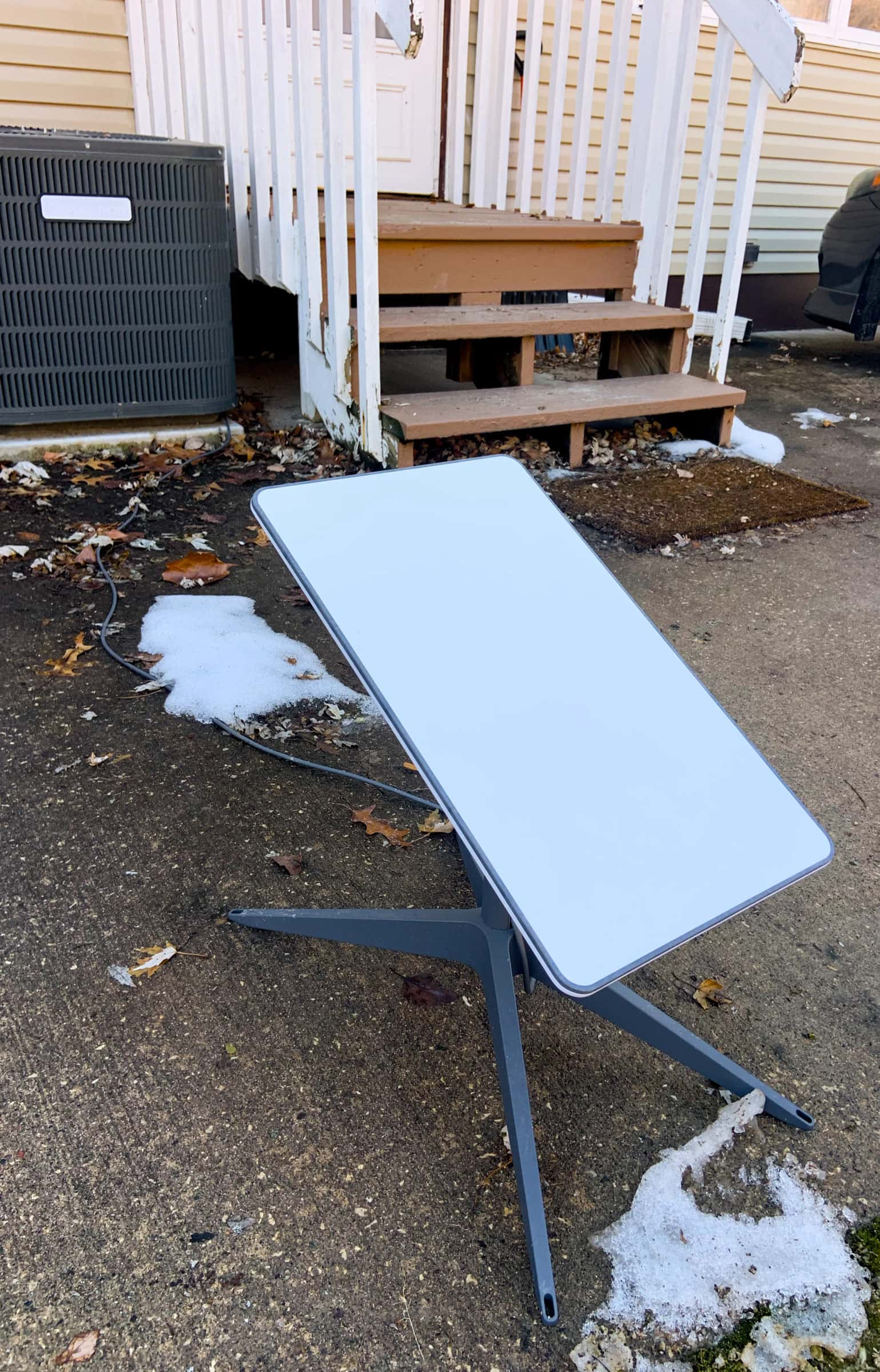
Ground vs roof: which is better?
Neither, by itself. The dish needs open sky, and the ground is the easiest place to test it. Starlink says two things here: the mount in some kits is meant for ground level or a quick test, and many customers find a permanent mount up high, on a roof or pole, works best. Our reading: if the ground scans clear and the dish is safe there, it can stay; if not, go up.
Ground wins on
- No holes, no ladder, no roof warranty worry
- Nothing to buy beyond the box
- Easy to brush off snow and to move later
- Renter-friendly where you control the yard
Roof or pole wins on
- Sky blocked low down by fences, sheds or the house
- Trees close to the only open patch
- Deep snow, drifts or a plowed driveway nearby
- Busy yards: kids, dogs, mowers
Why low things matter more on the ground
On the ground the dish sits about 2 ft up, so a fence, a shed or your own house rises much higher in its sky than it would from the roof. This table shows how high each one appears, from the stand and from a 6 ft post. Under 20° matches the clear-sky line in Starlink’s business install guides; over 35° is inside the dish’s view (our reading of its 110° field of view).
| What’s near the spot | Distance | From the stand (~2 ft) | From a 6 ft post |
|---|---|---|---|
| 4 ft chain-link fence | 8 ft | 14° clear | 0° clear |
| 6 ft privacy fence | 10 ft | 22° borderline | 0° clear |
| 6 ft privacy fence | 20 ft | 11° clear | 0° clear |
| 10 ft garden shed | 15 ft | 28° borderline | 15° clear |
| One-story roofline, 15 ft | 25 ft | 27° borderline | 20° clear |
| 40 ft tree | 50 ft | 37° in view | 34° borderline |
Our geometry, not Starlink figures. A fence only blocks the part of the sky it covers, so a borderline fence on one side often still works; the Starlink app scan is the final word. Big trees need real height: see pole mounts.
How to set up Starlink on the ground: 8 steps
Step 1: Scan three or four spots in the yard
Set the dish down where you’d like it, or hold your phone at that height, and run a sky scan in the Starlink app. Try the middle of the lawn, the far side of the yard and a spot near the house. Starlink’s install guides say to confirm the spot with that tool before you settle on it. How to scan.
Step 2: Rule out the snow and drip zones
Skip the strip under the roof edge (roof slides and drips), the lee side of a fence or hedge (drifts), and anywhere the plow or snow blower throws snow. The drawing below shows all three.
Step 3: Keep it off metal
Set it on soil, pavers or concrete, not on a metal shed roof, a trailer deck or a steel plate. Starlink says placing the dish directly on metal may interfere with GPS and isn’t supported.
Step 4: Make a firm, level pad
Two or three patio pavers on packed gravel stop the stand from sinking or rocking when the ground softens. Keep the pad a little higher than the lawn so water drains away.
Step 5: Seat the cable, then set the dish on its stand
Push the Starlink cable fully into the dish before it sees any weather: Starlink says that gives the connection its rated water resistance. Keep the dish on its kickstand, tilted, never flat: Starlink says a flat dish can pool rain and drop service.
Step 6: Secure the stand against wind
Starlink doesn’t publish a way to stake the kickstand down. Its X-Frame Base is made for ground installs; otherwise sandbags or paver weights on the stand’s feet (never on the dish) keep a gust from tipping it. That’s our rule of thumb.
Step 7: Protect the cable run to the house
Run the cable along the fence line or the edge of a bed, not across the mowing path. Starlink says its cable isn’t rated to be buried or to sit in water, and it publishes no conduit guidance. Our rule of thumb for crossing a lawn: sealed outdoor-rated conduit with no low spot where water can pool. Call 811 before you trench.
Step 8: Power up, align, and check again in a week
Use the Starlink app’s alignment tool, then look at the obstruction view after a few days of use. If a fence or hedge shows up, raising the dish a few feet usually fixes it (see the table below).
Snow country: keep it above the drift
Starlink’s dishes melt snow: the Standard 4 X spec sheet lists up to 1.5 in/hour, and Starlink says the dish should melt snow over time except in extreme blizzards. But heavy snow that completely covers the dish may cause outages, and Starlink recommends a spot where it won’t get buried. A dish can melt what falls on it. It can’t melt its way out of a drift that buries it from the side (our reading).
- Raise it. In the snow belt (the Great Lakes, northern New England, the Rockies, Alaska), a short metal post set in the ground with the pipe adapter keeps the dish above your usual snow depth. Starlink’s Standard adapter fits 1.25–2.5 in pipe; the V5 box includes its own.
- Clear it gently. Starlink says light ice doesn’t usually hurt performance, and that you can remove snow or ice gently, but never with picks, chisels or scrapers. A soft broom works.
- Think about spring. Low spots flood when snow melts. Starlink says the cable isn’t rated to sit in water.
More on Snow Melt: Starlink in snow.
Mowers, pets, kids and theft
Starlink doesn’t publish advice on any of these. Here’s ours.
- Mowers and string trimmers are hard on any cable left in the grass. Keep the cable along a fence or bed edge, clipped down, or in conduit.
- Dogs chew cables, and a curious dog can knock the stand over. A small ring of garden fencing around the dish solves both.
- Kids treat it as a toy. Same fix: a planter ring or low fence.
- Theft. The dish is light: Starlink lists the Standard 4 X at 6.4 lb and the V5 at 2.4 lb. If the spot is visible from the road, put it behind the house or fence, as long as the scan stays clear.
Measure the cable before you choose
Every current kit comes with a 15 m (49.2 ft) cable. Measure from the spot to where the cable enters the house and on to the router’s outlet. A spot far out in the yard can run out of cable. What else you need.
When to raise it, and how
- A fence, hedge or shed shows in the scan: a 4–6 ft post often drops it under the line (see the table above).
- Snow buries it: a post above your usual snow depth, out in the open.
- Trees taller than the house: a real pole, or the roof. Pole mounts · All mount options.
Don’t order yet if…
- every spot in the yard scans with big blocked areas and you can’t raise the dish
- the only clear spot is farther from the house than the cable reaches
- the yard isn’t yours to use (a shared lawn or common area) and no one has agreed to the dish
Questions this page answers
Can Starlink just sit on the ground?
Yes. Starlink’s support pages say the Standard kit’s detachable kickstand can be used for a quick setup or a permanent install. What matters is the sky: the spot has to scan clear in the Starlink app.
Will snow bury a Starlink dish on the ground?
It can. Starlink says heavy snow fully covering the dish may cause outages, and recommends a spot where it won’t get buried. The dish melts snow that lands on it, but it can’t dig itself out of a drift. In snow country, a short post is the fix.
Can I bury the Starlink cable in my yard?
Not bare. Starlink says the cable isn’t rated to be buried or to sit in water, and it publishes no conduit guidance. Our rule of thumb: sealed outdoor-rated conduit with no low spot where water can pool, and a call to 811 before you dig.
Will my dog or the lawn mower damage it?
They’re the most common risks for a ground setup. Keep the cable off the mowing path and out of reach of chewers, and put a small fence or planter ring around the stand if you have pets or kids.
Do I need a mount to put Starlink on the ground?
No. The kickstand in the box is a ground stand. Starlink also sells an X-Frame Base for ground installs ($75 on its shop on Nov 3, 2026), and a short post with a pipe adapter lifts the dish above snow and fences.
What we checked this page against
- Standard 4 X spec sheet, PDF · seen Nov 3, 2026
- Business install: choosing a location (support article) · seen Nov 3, 2026
- Aligning the dish (support article) · seen Nov 3, 2026
- Checking a spot before you install (support article) · seen Nov 3, 2026
- Standard 4 X setup guide, PDF · seen Nov 3, 2026
- Standard 4 X setup guide (support article) · seen Nov 3, 2026
- Whether you need a mount (support article) · seen Nov 3, 2026
- Third-party mounts (support article) · seen Nov 3, 2026
- Starlink shop, public accessory prices · seen Nov 3, 2026
- App alert list (support article) · seen Nov 3, 2026
- Water resistance (support article) · seen Nov 3, 2026
- Cable length and indoor routing (support article) · seen Nov 3, 2026
- Snow, rain, wind, lightning and temperature (support article) · seen Nov 3, 2026
- Snow and ice performance (support article) · seen Nov 3, 2026
- Maintenance and troubleshooting (support article) · seen Nov 3, 2026
- V5 spec sheet with Router Mini, PDF · seen Nov 3, 2026
- Standard accessories guide, PDF · seen Nov 3, 2026
Each number on this page traces back to one of these entries; our fact rules explain how. If a reading has drifted, the corrections log shows how it gets fixed.